
 By
By Floor Plan to 3D Render
A floor plan is the backbone of every building project, but let’s be honest: most people cannot read one. Lines, symbols, and dimensions make perfect sense to architects, yet buyers, clients, and investors often struggle to picture the finished space. That is where a floor plan to 3D render makes all the difference.
In this guide, you will learn what a floor plan to 3D render is, why it matters, how the process works, and how to get the best results for your next project.
What Is a Floor Plan to 3D Render?
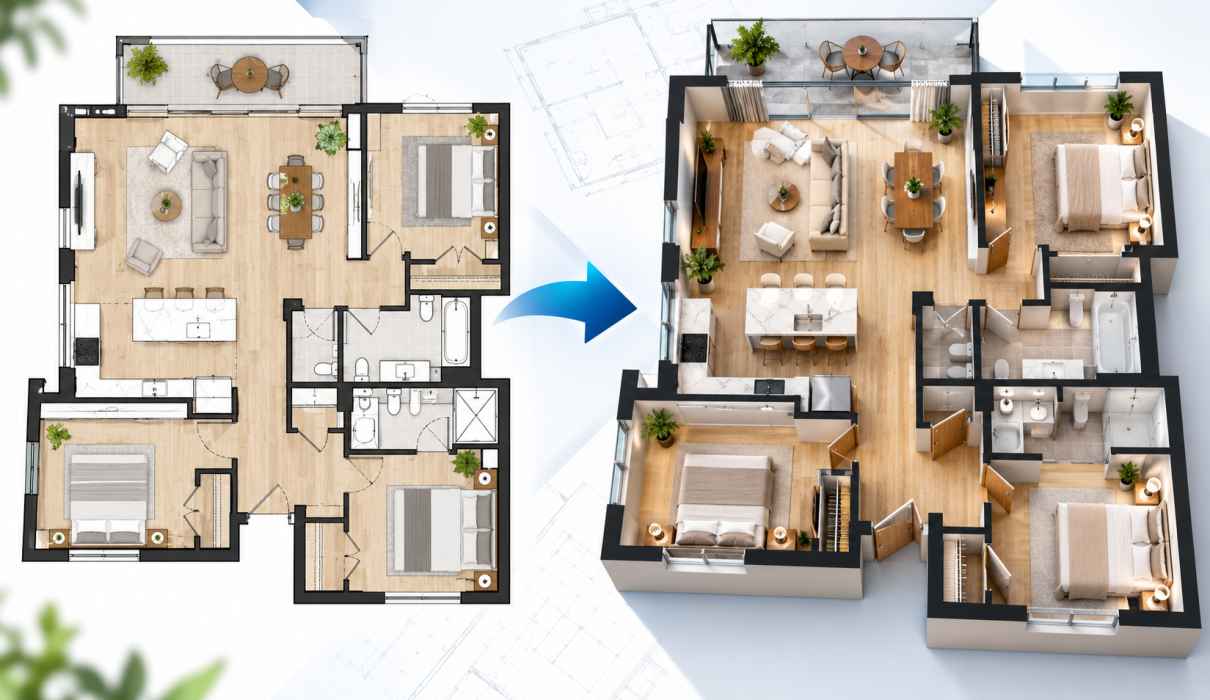
A floor plan to 3D render is the process of converting a flat, two-dimensional layout into a realistic three-dimensional image. The result shows walls, rooms, furniture, materials, lighting, and even decor in a way anyone can understand at a glance.
There are two main types of output:
- 3D floor plans: A bird’s-eye or cutaway view of the whole layout, showing how rooms connect and flow.
- Photorealistic interior and exterior renders: Lifelike images from a human-eye perspective, showing the finished look and feel of a space.
Both start from the same source, which is your 2D plan. A good floor plan to 3D render turns technical drawings into visuals that tell a story.
Why a Floor Plan to 3D Render Matters
Whether you are an architect, interior designer, real estate agent, or homeowner, converting plans into 3D visuals offers clear advantages.
1. It Makes Spaces Easy to Understand
Most clients cannot judge room size, proportions, or flow from a flat drawing. A floor plan to 3D render removes the guesswork. People instantly see how a living room connects to the kitchen or how much space a bedroom really offers.
2. It Helps You Sell Faster
In real estate, off-plan and pre-construction properties are hard to market without visuals. Buyers respond to images they can imagine themselves in. Listings with 3D renders and 3D floor plans tend to attract more attention and inquiries than those with plain drawings alone.
3. It Catches Design Problems Early
A door that clashes with a cabinet, a corridor that feels too narrow, or poor natural light are easy to miss on paper. Visualizing a floor plan to 3D render exposes these issues before construction begins, when changes are cheap.
4. It Improves Client Communication
Few things cause more friction than a client saying, “That’s not what I imagined.” Clear visuals align expectations from the start, reduce revision rounds, and speed up approvals.
5. It Saves Money
Fixing mistakes on site is far more expensive than fixing them on screen. A floor plan to 3D render is a small investment that can prevent costly rework.
How the Floor Plan to 3D Render Process Works
The workflow is straightforward, whether you work with a studio or build the visuals yourself.
Step 1: Prepare Your 2D Floor Plan
Start with an accurate plan in CAD, PDF, or even a clean hand sketch. Make sure dimensions, wall thicknesses, door and window positions, and room labels are clear. The more precise your input, the more accurate the final output.
Step 2: Build the 3D Model
The plan is traced and extruded into a 3D model. Walls rise to the correct height, openings are cut for doors and windows, and floors, ceilings, and stairs are added. Software such as SketchUp, Revit, 3ds Max, or Blender is commonly used at this stage.
Step 3: Add Materials and Furniture
This is where the space starts to feel real. Flooring, wall finishes, cabinetry, fixtures, and furniture are chosen to match the intended style, whether modern, minimalist, classic, or industrial.
Step 4: Set Up Lighting and Cameras
Lighting does more to create realism than almost any other element. Natural daylight, warm evening lamps, and soft shadows all shape mood. Camera angles are then chosen to show each space at its best.
Step 5: Render and Refine
A rendering engine such as V-Ray, Corona, Lumion, Enscape, or D5 Render calculates light and materials to produce the final image. Light post-production adjusts color, contrast, and detail. At this point, a floor plan to 3D render is ready to share.
Types of Floor Plan to 3D Render Outputs
Different goals call for different visuals. Here are the most common options:
- 3D floor plan (top-down): Ideal for property listings and brochures.
- Cutaway or isometric view: Shows the layout and furniture in a compact, easy-to-read format.
- Interior perspective renders: Best for showcasing design details in key rooms.
- Exterior renders: Display the facade, landscaping, and surroundings.
- Virtual tours and walkthroughs: Let clients explore the space interactively.
Many projects combine several of these to give a complete picture.
Tools for Converting a Floor Plan to 3D Render
Your choice depends on skill level, budget, and quality needs.
For beginners and quick results Online planners such as Floorplanner, RoomSketcher, and Planner 5D let you draw or upload a plan and generate basic 3D views quickly. They suit homeowners and small listings.
For professionals SketchUp, Revit, ArchiCAD, and Blender offer full control over modeling and detail. Paired with high-end render engines, they deliver photorealistic quality.
For fast, AI-assisted workflows Newer AI tools can turn plan-based views into stylized visuals in minutes. They are great for early concepts, though important details should always be checked against your original drawings. Features and pricing change often, so review each tool’s current offering before you commit.
Tips for Getting the Best Floor Plan to 3D Render
Provide accurate drawings. Errors in the plan carry straight into the render. Double-check measurements before you start.
Define your style early. Share mood boards, color palettes, and reference images so the visuals match your vision.
Choose realistic furniture. Properly scaled, well-placed furniture helps viewers judge space accurately and makes rooms feel lived in.
Pay attention to lighting. Good light separates a flat image from a stunning one. Consider the time of day and the direction of windows.
Keep the composition clean. Avoid overcrowding. A few thoughtful details are more effective than clutter.
Plan for revisions. Review early drafts carefully and give clear, consolidated feedback to avoid endless back-and-forth.
Common Mistakes to Avoid
- Starting with unclear or incomplete plans. Missing dimensions lead to guesswork and delays.
- Ignoring scale. Oversized furniture can make a small room look generous, which misleads buyers and clients.
- Over-editing images. Heavily altered visuals can set unrealistic expectations and harm trust.
- Choosing price over quality. Very cheap services may skip lighting and detail, leaving images flat and unconvincing.
- Skipping a review stage. Always check the model against the original plan before final rendering.
Who Benefits Most?
- Architects use renders to present concepts and win approvals.
- Interior designers test layouts, finishes, and furniture before purchasing.
- Real estate developers and agents market properties before they are built.
- Homeowners visualize renovations and avoid costly surprises.
- Builders and contractors better understand design intent before construction.
In every case, a well-made floor plan to 3D render saves time, builds confidence, and supports better decisions.
Frequently Asked Questions
How long does a floor plan to 3D render take? Simple 3D floor plans can be ready in a day or two. Detailed photorealistic interiors may take several days to a couple of weeks, depending on complexity and the number of views.
Can I convert a hand-drawn sketch? Yes. As long as the sketch is clear and includes dimensions, a professional can model it accurately.
What file formats are accepted? Most studios accept CAD files (DWG), PDFs, images (JPG or PNG), and sketches. Check with your provider for specifics.
How much does it cost? Prices vary widely based on the size of the project, level of detail, and number of images. Online tools are usually cheaper, while custom professional work costs more but delivers higher quality.
Is a 3D floor plan the same as a 3D render? Not exactly. A 3D floor plan is typically an overhead view of the layout, while a 3D render is often a realistic perspective image. Many projects use both.
Conclusion
A floor plan to 3D render closes the gap between technical drawings and real understanding. It helps clients see their future space, helps sellers market properties earlier, and helps designers spot problems before they become expensive. With clear plans, a defined style, and the right tools or partner, you can turn flat lines into visuals that inspire confidence and drive decisions.
If you have a project coming up, consider making a floor plan to 3D render part of your process from the start. The sooner people can see a space, the sooner they can fall in love with it.